Cursive Handwriting Name Generator
Free printable cursive name tracing worksheets
Type any name and this free cursive handwriting name generator turns it into a printable tracing worksheet. Choose from 13 cursive and handwriting fonts, pick dotted, outline or solid gray letters, and print or save a PDF with 3-line writing guides. Names are typed in your browser and never uploaded.
Customize
More options
The preview updates as you change the settings.
Write Your Name in Cursive – Free Cursive Name Generator
Type a first name, a full name or any short word and this cursive name generator shows it in a flowing cursive font straight away. When you like the result, download a custom cursive worksheet as a PDF and let your child trace it.
Choose dotted letters for easy tracing, outline for a challenge, or solid gray to practice over. Every line has top, middle and base guides, and you can print 1 to 10 rows per page (the default is 5), up to 5 pages, on US Letter or A4.
Custom Cursive Practice for Names
Names are a motivating way to start cursive. Try a first name for 3 lines, then a full name or surname. Begin with the dotted style, switch to solid gray, and finish by writing the name on a blank line. For spelling words and sentences, use our cursive handwriting generator.
Why a Name Looks Different in Each Font
Cursive capital letters change the most from one font to another. Try two or three fonts and watch the preview update, then choose the one that is easiest to read and closest to the style taught at school. A simpler font is usually better for beginners, while a decorative script is fun for cards and signs.
Ways to Use a Cursive Name
Print the sheet so your child can trace their name, then let them copy it on the blank line. Older children enjoy working out a signature. You can also use the printed name as a sample for a notebook label, a birthday card or a bedroom door sign.
Tips for Tracing a Cursive Name
Turn on the start arrow to show where each name begins. Encourage your child to keep the pencil on the paper through a joined word and lift only at the end, then go back to dot the i or cross the t. Slow, smooth strokes matter more than speed.
How to make a cursive name worksheet
- Type the name. Enter one name, or several names with one per line.
- Choose a font and tracing style. Playwrite US Trad is the default. Use the live preview to see how the name joins in each font. Dotted letters are the easiest to follow; outline and solid gray are the next steps.
- Set the layout. Pick the number of rows (1 to 10) and the paper size (US Letter or A4). Open More options for row height, letter size, letter spacing and the page layout. Then press Generate Worksheet, and use Print or Save as PDF when the preview looks right.
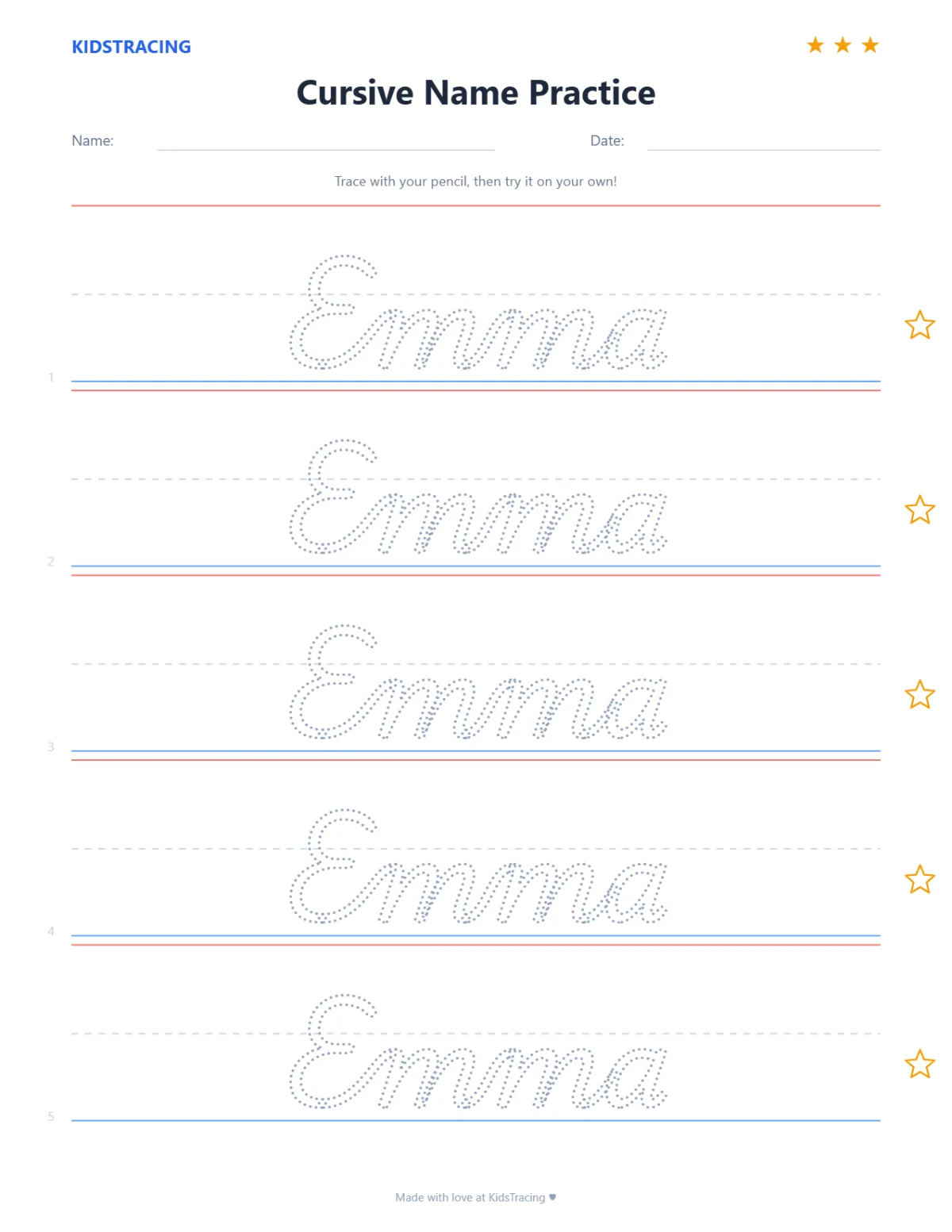
From tracing to writing on their own
Children usually do better when the support is removed slowly. The same name can be printed four ways:
- Dotted letters, with the green start arrows switched on under More options: the child follows the dots.
- Outline letters: the child traces the edge of each letter.
- Solid gray letters: a lighter guide to write over.
- Trace + empty practice line: one traced row followed by a blank line to write the name alone.
Print one sheet at each stage over a few weeks, and keep the same font so the letter shapes stay familiar.
Who uses this cursive name generator
- Parents: practice a child’s name at home with a sheet close to the cursive they will see at school.
- Teachers: make first-week name sheets for a whole class by typing one name per line.
- Tutors and occupational therapists: use the same font and layout each session, so progress is easy to compare on identical sheets.
- Older learners: practice a signature in joined cursive.
Tips for long and tricky names
- Long names: the name shrinks to fit its row by itself. If a very long name still looks cramped, choose a smaller letter size under More options, or put the first and last name on separate lines.
- Short names: use the “Two per row” layout under More options. It prints the name twice on each row to fill the page.
- Full names: type the first and last name on one line, or put each on its own line.
- Capital letters: capitals can look very different from lowercase letters in cursive, so compare a few fonts in the live preview before you print.
Choosing a font for the name
Open the font menu to see the name in other cursive styles.
- Playwrite US Trad is a classic joined cursive with the slanted, flowing letters many American schools teach. It is the default.
- Playwrite GB J is a joined cursive in a UK school style.
- Playwrite US Modern and Playwrite GB S are simpler pre-cursive styles. Their letters are not joined, which makes them a gentle first step.
- Dancing Script is a decorative script. It looks pretty, but it is better for fun projects than for learning to write.
Schools teach slightly different cursive models, so if your child's class uses a particular style, choose the font that looks closest to it. All fonts are open-source and stored on this website.
Frequently asked questions
How do I write my name in cursive?
Type your name into the box. The preview shows it in a cursive font and you can download it as a printable PDF.
Is the cursive name generator free?
Yes. It is free, needs no sign-up, and your name is never uploaded.
Can I print a custom cursive name worksheet?
Yes. Pick dotted, outline or solid gray letters, choose 1 to 10 rows per page and download the PDF in US Letter or A4.
Is it the same cursive my school teaches?
Not exactly. Dancing Script is a connected script font, and school cursive styles differ from place to place. Check your school’s approach.
What age can kids start writing their name in cursive?
There is no single age. Many schools introduce cursive around ages 7 to 8, after print letters feel comfortable. A child who already writes their name in print can try tracing it in cursive earlier, as long as the name is short and the practice stays relaxed.
Can I make a worksheet for several names at once?
Yes. Type one name per line in the name box and generate the worksheet. Each name gets its own row, and if you have more names than rows, the next page carries on with the remaining names. You can print up to five pages.
Which cursive font should I choose?
Start with the default, Playwrite US Trad, a traditional school-style cursive. If your school teaches a different style, compare Playwrite GB J, Playwrite GB S and Edu QLD (pre-cursive joins) in the live preview. Andika, Comic Neue, Fredoka, Patrick Hand and the Edu VIC WA NT and Edu NSW ACT fonts are print-style fonts that are useful before cursive.
Can I print the worksheet on A4 paper?
Yes. Choose US Letter or A4 under paper size before you print or save the PDF.
Free printable workbooks
Want a planned set instead of a single page? These free PDF workbooks use the same worksheets in a step-by-step order.
Related worksheet tools
Explore more: Handwriting and Tracing Worksheets for Kids · All free worksheet tools
Guides for parents and teachers: How to Write Your Name in Cursive · How to Teach Cursive Handwriting to Kids